ကျွန်တော်ရဲ့ဘလော့လေးကိုဝင်ရောက်ကြည့်ရှု့သူများစိတ်ချမ်းသာခြင်းပြည့်စုံနိူင်ကြပါစေလို့ဆု့တောင်းလျှက်ပါဗျာ၊...

Showing posts with label ဖုန္းေဆာ႕ဝဲ. Show all posts

Tuesday, 3 July 2018

♪ iPhone X စတိုင္နဲ႕အသံုးျပဳနိုင္မယ့္ - X Launcher Pro: Phone X Theme, IOS Control Center v2.0.0 Apk (27-June) ♫


X Launcher Prime:Phone X Theme, IOS Control Center Apk
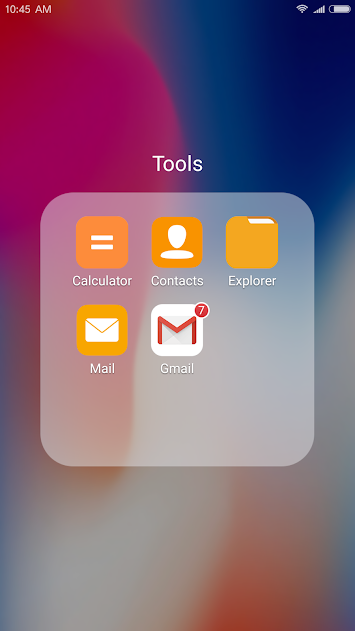
အခုတင္ေပးလိုက္တာကေတာ့ iPhone X ဒီဇိုင္းနဲ႕ Android ေပၚမွာအသံုးနိုင္မယ့္ Launcher ေလးတစ္ခု ျဖစ္ပါတယ္ဗ်ာ။ Screen အေပၚကဒီဇိုင္းအေနနဲ႕ကေတာ့ iPhone X နဲ႕ထပ္တူပါပဲ။ တခ်ိဳ႕တခ်ိဳ႕ေသာ Feature ပိုင္းေတြနဲ႕ Setting အပိုင္းေတြလည္း iPhone X အတုိင္းအသံုးျပဳရမွာပါဗ်ာ။ နမူနာၾကည့္နုိင္ေအာင္လို႕ ေအာက္မွာ Screen Shot ေလးေတြျပေပးထားပါတယ္ဗ်ာ။ Android OS 4.1 ႏွင့္အထက္ဖုန္းမ်ားမွာအသံုးျပဳနိုင္မွာျဖစ္ပါတယ္ဗ်ာ။


MAIN FEATURES:
No Ads
We have removed the annoying ads in the pro, there will be no accidental disturbances, concentrate on immersion in what you have to do
OS11 Style Control Center
Swipe up to open Control Center; Set WiFi, Network, Brightness, Volume, Take Photo quickly.
Various Themes
We designe a cool Theme Center to provide various themes, Adaptive to the themes you select, which can bring you smooth interface like OS11 like experience.
Latest Wallpaper and Icon sets
The rich icons for Phone X library and latest wallpapers give you a comprehensive experience.
We also custom icon pack for popular apps to IOS Style.
Powerful App Manager
Swipe down to open App Manager; Find local apps and drop them to desktop quickly.
Apple Style Folder
We design a IOS Style Folder, you can drop an app to another to create a folder.
Cool 3D effects
We design 8 screen animation effects, like Breeze, Tunnel, Waves,Cube, Carousel, Tune out, Fan, Rotation.
Weather and Time widget
We provide a Weather and Time widget, you can long press on screen and drag it to screen. You can get the weather forecast in recent days.
Hide Apps
Double-finger zoom to enable hide application feature to Protect your privacy all around.
Screenshot Image     Screenshot Image

Screenshot Image     Screenshot Image

Screenshot Image     Screenshot Image

Screenshot Image     Screenshot Image
**  Step-1.ေအာက္က Download Button ကိုႏွိပ္လိုက္ပါ  


**  Step-2. "5sec". ေလာက္ေစာင္႕ေပးပါ။

**  Step-3. "  << SKIP AD >>   ".ကိုႏွိပ္ေပးပါ။

**  Step-4. Download Link က်လာပါလိမ္႕မယ္။


**  အဆင္ေျပပါေစဗ်ာ။

Credit.by   Pyae Phyo (MMiTD)


http://zipansion.com/1rDGw

♪ ဓါတ္ပံုေတြကို Professional ဆန္ဆန္ျပဳျပင္ႏိုင္မယ့္ - Adobe Photoshop Express Premium v4.3.497 Apk (28-June) ♫


Cover art
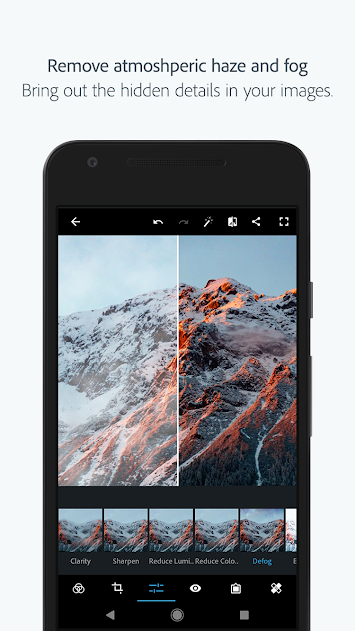
Android ဖုန္း္မွာဓါတ္ပံုျပင္ဖို႕ အတြက္ဆိုရင္ App ေတြအမ်ားၾကီးရွိပါတယ္။ အဲ့ဒီအမ်ားၾကီးထဲကမွ ဒီတစ္ခါ မိတ္ဆက္ေပးခ်င္တာကေတာ့ Adobe Photoshop Express Premium ဆိုတဲ့ App ေလးပဲျဖစ္ပါတယ္ဗ်ာ။ Photoshop ဆိုတဲ့အတိုင္းပဲ ဓါတ္ပံုတစ္ပံုကို တကယ့္ကို Professional ဆန္ဆန္ျပဳျပင္ေျပာင္းလဲေပးနိုင္မွာ ျဖစ္ပါတယ္ဗ်ာ။ Edit လုပ္ဖို႕အတြက္ အသင့္ေတာ္ဆံုး အေကာင္းဆံုး Tools ေတြလည္းပါ၀င္ပါတယ္။ Effect ေတြ လည္းမ်ိဳးစံုပါ၀င္ပါေသးတယ္ဗ်ာ။ jpg , png ဖိုင္အျဖစ္ Save နိုင္မွာျဖစ္ပါတယ္။ Photoshop ဆိုရင္ေတာ့အမ်ား ၾကီးညႊန္းေနစရာမလိုေအာင္ ေကာင္းျပီးသားပါ။ ေအာက္ဆံုးက Link မွာေဒါင္းယူသြား နိုင္ပါတယ္ဗ်ာ။ Feature ေတြကိုဒီထက္ပိုျပီး အေသးစိတ္ေလ့လာခ်င္တယ္ဆိုရင္ေတာ့ ေအာက္မွာ ရွင္းျပ ေပးထားပါ တယ္ဗ်ာ။ ဆက္လက္ေလ့လာနိုင္ပါတယ္။


PHOTO EDITOR
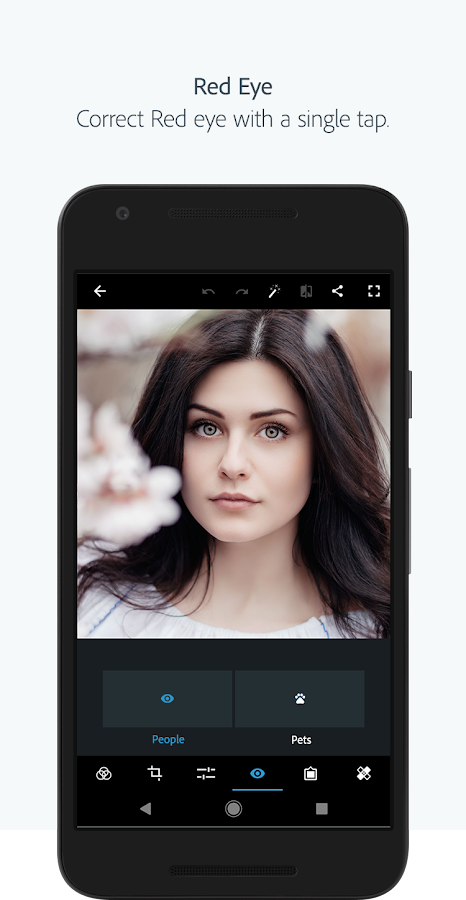
- Basics: Crop, straighten, rotate, and flip your photos. Remove red eye and pet eye.
- Auto-Fix: A one-touch adjustment for contrast, exposure, and white balance.
- Blemish removal: With user, friendly one touch, remove spots, dirt, and dust from your photos.
- Corrections: Instantly light up your selfie or photo with slide controls for clarity, contrast, exposure, highlights, shadows, blacks, whites, temperature, tint, sharpen, saturation and vibrance.
- Filters or Looks: A new smart way to turn any photo into artwork - choose from over 80+ preset eye-catching fun styles. You can control intensity of your looks for realistic photo effects.
- Watermark images: Easily add custom text or graphical watermark on images.
- Customization: Create and save your own Looks.
- Photo Frames: Add a distinctive personal touch to your photos with over 15 borders and frames. For a harmonious look, match the border color with the colors in the image.
- Raw photo support: Import and edit photos in raw format.
- Share: Easily share to all your favourite social sites: Facebook, Twitter, Instagram, and more.
- Watermark images: Easily add custom text or graphical watermark on images.
- Image resize: Use this option to resize an image before saving.
- JPEG Quality output – Customize the quality and size of your output image.

COLLAGE MAKER
- Create a photo collage in seconds with our photo grid feature.
- Choose from a wide variety of grid layouts.
- Pick any photo in the layout, and edit it the way you like with the photo editor.
- Hold, drag and drop to swap photo position, pinch to zoom in or out, or drag the handles to resize.
- Add new image or replace by simple selection.
- Adjust/fix a single image and apply any look.
- Change border thickness and color.
- Print directly from the application

AWESOME FEATURES
- One-touch Filters or Looks: Get additional filters for fun, fresh looks!
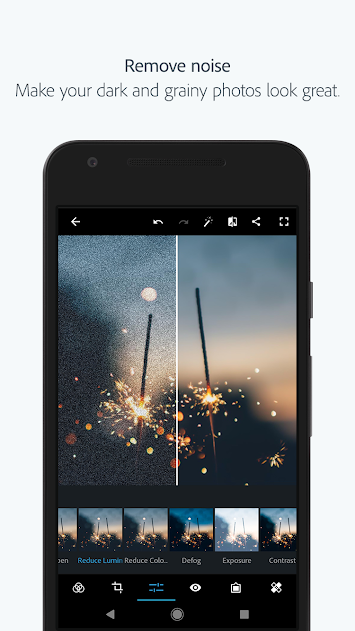
- Noise Reduction: Minimize unwanted grain and speckling in night photos and low light photos.
- Defog: Reduce fog and haze in photos.
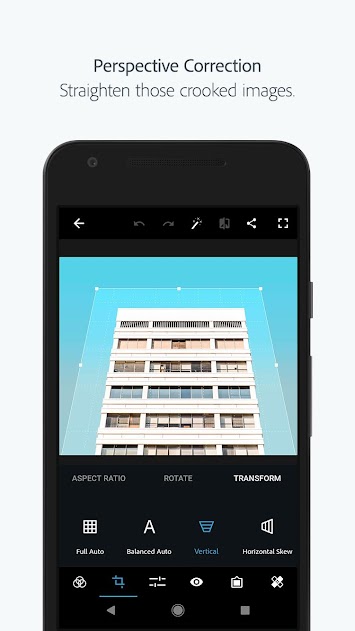
- Perspective Correction – Fix the skewed perspective photos with just a click! Choose from auto (balanced or full auto), vertical, or horizontal correction options.- Access Premium Features when you sign in with an Adobe ID:
- Access these features when you sign in with an Adobe ID

Once you’re done with the photo editor or collage maker, share your finished work directly to Instagram, Facebook, Twitter, WhatsApp, or your other favorite social networks!

Want to do more with your photos? Have a look at these other free Adobe Photoshop mobile apps:
- Photoshop Mix — Cut out and combine elements from different images, blend layers, and apply looks on your iPad or iPhone — anywhere you are.
- Photoshop Fix — Edit facial features, heal, lighten, liquefy, color and adjust your images to perfection — and then easily share them across other Creative Cloud desktop and mobile apps.
- Lightroom Mobile – Capture, edit, organize and share professional quality images from your smartphone or tablet.

Photoshop Express supports the following file formats:
- Photo: JPG, PNG
- Raw files: arw (SONY), cr2 (CANON), crw (CANON), dng, erf (EPSON), raf (FUJI), 3fr & fff (HASSELBLAD), dcr (KODAK), mrw (KONICA), mos (LEAF), rwl (LEICA), nef & nrw (NIKON), orf (OLYMPUS), rw2 (PANASONIC), pef (PENTAX), srw (SAMSUNG)
- While we aim to provide support for raw files from the latest camera models of most camera manufacturers, we cannot guarantee universal raw support.


Screenshot Image     Screenshot Image

Screenshot Image     Screenshot Image

Screenshot Image     Screenshot Image

Screenshot Image        Adobe Photoshop Express:Photo Editor Collage Maker- screenshot


**  Step-1.ေအာက္က Download Button ကိုႏွိပ္လိုက္ပါ  


**  Step-2. "5sec". ေလာက္ေစာင္႕ေပးပါ။

**  Step-3. "  << SKIP AD >>   ".ကိုႏွိပ္ေပးပါ။

**  Step-4. Download Link က်လာပါလိမ္႕မယ္။


**  အဆင္ေျပပါေစဗ်ာ။

Credit.by Pyae Phyo (MMiTD)


http://zipansion.com/1rDs9


ဗုဒၶစာ​ေပ ဆုိတဲ႔ ေဆာ႔ဝဲေလး Application For Android

 ဗုဒၶစာ​ေပ ဆုိတဲ႔ ေဆာ႔ဝဲေလးပါ။ဗုဒၶစာ​ေပ စာေပေတြကုိ မိမိဖုန္းထဲ႔ကေန ေလ႔လာဖတ္ရႈတတ္သူမ်ားအတြက္ အရမ္းတန္းဖုိးရွိတဲ႔ ေဆာ႔ဝဲေလးပါ။ ဒါအျပင္ -Internet ဖြင္​့၍ တရား​ေတာ္​မ်ား နာၾကားႏုိင္ျခင္းတရားစာအုပ္​မ်ားကုိလည္း အလြယ္ကူဆုံး ေဒါင္းရယူႏုိင္ပါတယ္။ဗုဒၶဘာသာဝင္သူေတြအတြက္ မရွိမျဖစ္ မိမိ ဖုန္းမွာေဒါင္းျပီး ေဆင္ထားသင္႔ပါတယ္။
ဝင္းလႈိင္-နည္းပညာ

ဖုန္းအတြက္ ျမန္မာစာအခက္အခဲကို ေျဖရွင္းေပးမယ့္ ေဆာ့ဝဲ APK

 ျမန္မာစာလြယ္လြယ္သြင္းနိုင္တ့ဲ Myanmar Font Changer 2018resret ေတြခ်မိလို႔ ပ်က္သြားခဲ႔ရင္လည္းစိတ္ပူစရာမလို႔ေနေတာ႔ဘူးေပါ႔Apkဖုန္းအမ်ိဳးအစား အစံုအလင္ကို တစ္ခ်က္တည္းနဲ႔ ျမန္မာစာ ျမန္မာေဖာင့္ လြယ္လြယ္သြင္းနိုင္တ့ဲ ေဆာ့ဝဲေလးဆိုေတာ႔ ပိုအစဥ္ေျပတာေပါ႔ ေဘာ္ဒါတို႔ေရ  ဖုန္းအမ်ိဳးအစား ၇/ မ်ိဳးအတြက္ ျမန္မာစာ ၁၀၀% ထည့္သြင္းနိုင္ပါတယ္။ Root မလိုပါဘူး ျမန္မာစာ အခက္အခဲရွိေနတ့ဲ ဖုန္းေတြအတြက္ နမူနာပံုေလးေတြႀကည့္ျပီး ေဒါင္းယူနိုင္ပါျပီလို႔ သတင္းေကာင္ပါးလိုက္ပါတယ္ခင္ဗ်
ေအာက္က Link မွာေဒါင္းယူပါ 6 M
ဝင္းလႈိင္-နည္းပညာ
Credit:   ေဆာ႕ဝဲလမ္းညြန္ And mobile mother

♪ File Mangaer ေတြထဲမွာအေကာင္းဆံုးထဲမွတစ္ခု - ES File Explorer File Manager v4.1.8.1 Apk (28-June) ♫


Cover art
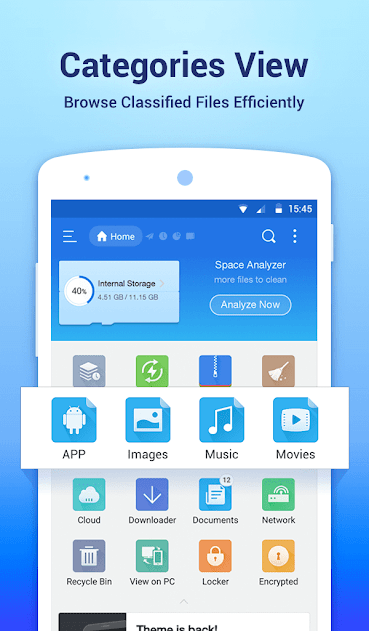
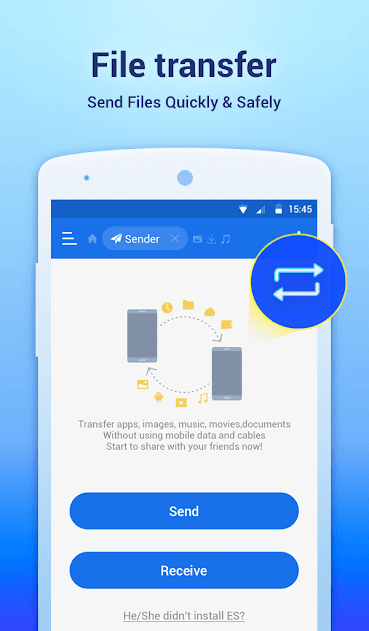
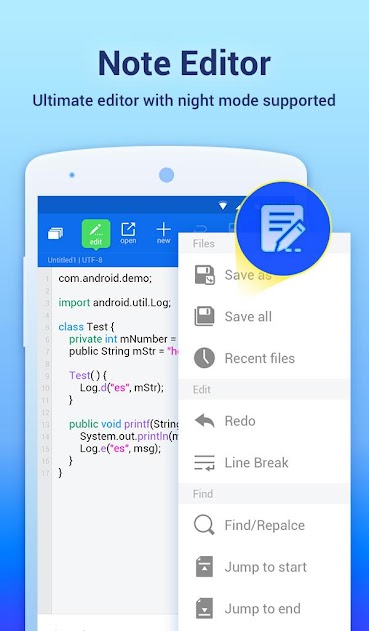
File Manager ဆိုတာကေတာ့ ဖုန္းတိုင္းမွာမရွိမျဖစ္ကို လိုအပ္တဲ့ Application တစ္ခုျဖစ္ပါတယ္ဗ်ာ။ ဖုန္းထဲမွာလည္း Original ပါျပီးသားပါပဲ။ ဒါေပမယ့္ Original ပါၿပီးသားကေတာ့ သာမန္ File Manager တစ္ခုပါပဲ။ ကၽြန္ေတာ္အခုတင္ေပးလိုက္တဲ့ ES File Explorer Pro v4.1.8.1 ကေတာ့ File Manager တစ္ခု ထက္သာလြန္ေကာင္းမြန္တဲ့ Function ေတြအမ်ားၾကီးထပ္မံပါ၀င္တာကိုေတြ႕ရပါတယ္ဗ်ာ။ ES File Explorer ကိုအသံုးျပဳလိုက္တာနဲ႕ မိမိရဲ႕ File Manager ထဲမွာရွိတဲ့ Data ေတြအားလံုးကို Backup/Restore လုပ္ေပးနုိင္မွာျဖစ္ပါတယ္ဗ်ာ။ File Manager ထဲမွာရွိတဲ့ မိမိရဲ႕ ဖိုင္ေတြကို Online ေပၚကို Upload တင္နိုင္ပါတယ္။ Dropbox , Mediafire , Box , GDrive , အစရွိတာေတြနဲ႕ Upload တင္နိုင္ပါတယ္ဗ်ာ။ Rar File ေတြ Zip File ေတြကိုလည္း ျဖည္နိုင္ ခ်ံဳ႕နိုင္မွာျဖစ္ပါတယ္ဗ်ာ။ ဒါ့အျပင္ အျခားေသာဖုန္းေတြမွာ Apk ေတြဟာ Icon ပံုမေပၚပါဘူး အခုတင္ေပး ထားတဲ့ ES File Manager ကိုသာ အသံုးျပဳမယ္ဆိုရင္ေတာ့ Apk ရဲ႕ Icon ေတြကိုလည္းအကုန္ျမင္ရမွာျဖစ္ ပါတယ္ဗ်ာ။ Photo ေတြဟာ လည္းဖြင့္မၾကည့္ေသးပဲနဲ႕ jpg file ေလးေတြကေနျပီး ပံုအေသးေလးေတြကို ၿမင္ေတြ႕ေနရမွာ ၿဖစ္ပါတယ္ဗ်ာ။ ဒါဆိုရင္ေတာ့သံုးရတာ အရမ္းအဆင္ေျပျပီးလြယ္ကူသြားပါျပီ။ ဖုန္းထဲမွာ မလိုအပ္တဲ့ Cache , Junk , စတာေတြကိုလည္း ရွင္းလင္းေပးမွာျဖစ္ပါတယ္ဗ်ာ။ Android OS 4.0 ႏွင့္ အထက္ဖုန္း မ်ားမွာအသံုးျပဳနိုင္မွာျဖစ္ပါတယ္ဗ်ာ။ 


File Manager and Folder Manager – Powerful tools put desktop-grade features in your pocket
 • Sender: Transfer apps, images, music, movies, documents, without using mobile data and cables. Support same Wi-Fi mode & auto-created hotspot.
 • File Manager: Manage your files with cut, copy, paste, rename, and compress operations
 • Built-in viewers and players for various file types: click to play music/videos, check image(s) and document(s)
 • Built-in ZIP and RAR support: allows you to compress and decompress ZIP files, unpack RAR files, and create encrypted (AES 256 bit) ZIP files

Remote File Access – Get to your files from anywhere
 • Cloud Storage: Supports Dropbox, Box.net, Sugarsync, Google Drive, OneDrive(SkyDrive), Amazon S3, Yandex and more clouds platforms
 • Remote File Manager: When this feature is enabled, you can manage files on your phone from your computer
 • Functions as an FTP and WebDAV client: Manage files on FTP, FTPS, SFTP, and WebDAV servers just like you manage files on your SD card
 • Access your home PC: Through your smartphone via WiFi with SMB

File transfer and File Explorer
 • Root Explorer: The ultimate set of file management tools for root users. Provides access to the entire file system and all data directories, and allows the user to change permissions.
 • Bluetooth file browser: You can copy and paste files between Bluetooth-ready devices. ES File Explorer (File Manager) supports OBEX FTP for browsing devices and transferring files between Bluetooth devices
 • Wi-Fi File transfer: Use your PC to wirelessly edit your mobile files using FTP

Library and Other – Find any and every file in seconds
 • App Manager: Categorize, uninstall, back up, and create shortcuts to your apps
 • Note editor: support syntax highlight for 30 languages (Java, XML, Javascript, PHP, Perl, Python, Ruby, etc).
 • SD Card Analyst: Analyze for App Associate Folder & Large Files & Recently Created Files & Redundancy Files & Duplicate Files to help save space; Detect Sensitive Permission & App Cache & Memory Usage to know your apps better
 • Kill tasks with a single click, increase memory and speed up your device: Includes a simple widget that stays on your home screen to let you know your current RAM situation and automatically kill tasks, with an ignore list to ignore the applications you want to keep running. The Task Manager module is required for this feature.
 • Cache Cleaner and Auto-start Manager: Delete junk files that take up valuable storage space. The Task Manager module is required for this feature.
 • Smart Charge: Display SD card status, real-time new files on screen when charging
  • Real-time Observer:help load recently added files in library 80% faster

ES File Explorer (File Manager) helps you handle all your files whether they are stored in your device's memory, microSD card, local area network, and cloud storage accounts.By default, ES File Explorer (File Manager) allows you to copy, move, rename, delete or share files to and from any of your storages. It also lets you browse and access your files by category.
Screenshot Image     Screenshot Image

Screenshot Image     Screenshot Image

Screenshot Image     Screenshot Image

Screenshot Image     Screenshot Image


**  Step-1.ေအာက္က Download Button ကိုႏွိပ္လိုက္ပါ  


**  Step-2. "5sec". ေလာက္ေစာင္႕ေပးပါ။

**  Step-3. "  << SKIP AD >>   ".ကိုႏွိပ္ေပးပါ။

**  Step-4. Download Link က်လာပါလိမ္႕မယ္။


**  အဆင္ေျပပါေစဗ်ာ။

Credit by Pyae Phyo (MMiTD) 


http://zipansion.com/1u8fp


♪ ဖုန္းတစ္ခုလံုးကိုေပါ့ပါးျမန္ဆန္လာေအာင္ Maintenance ျပဳလုပ္ေပးႏိုင္မယ့္ - 3C Toolbox Pro v1.9.8.3 Apk (28-June) ♫

Cover art
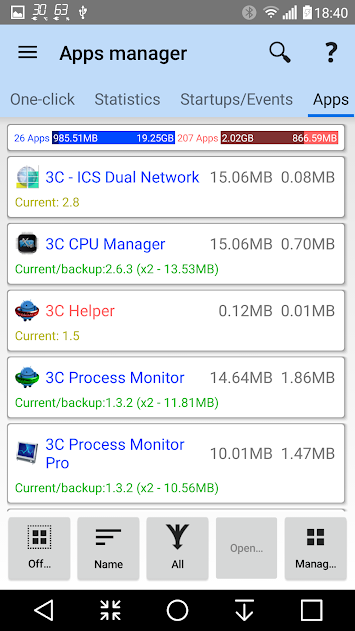
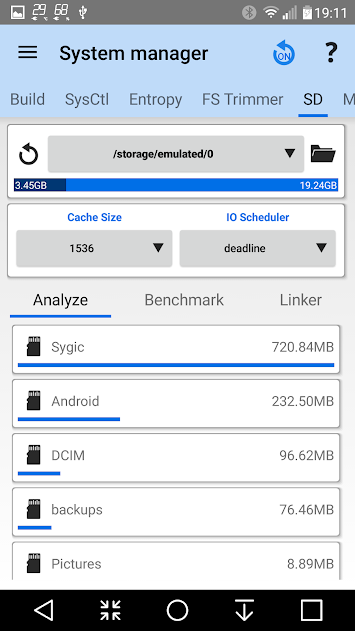
Android Phone တစ္လံုးအတြက္ အသံုးတည့္ေစမယ့္ Feature ေပါင္းမ်ားစြာ Tools ေပါင္းမ်ားစြာပါ၀င္တဲ့ Application အသစ္ေလးတစ္ခုတင္ေပးလိုက္ပါတယ္ဗ်ာ။ ဖုန္းတစ္ခုလံုးကို ေပါ့ပါးျမန္ဆန္ သြားေအာင္ျပဳ လုပ္ေပးႏိုင္မယ့္အျပင္ SMS , Contact , Call Log , Application မ်ားကို Backup & Restore ျပဳလုပ္ေပး နိုင္ျခင္း ၊ Android Phone တစ္လံုးရဲ႕ System တစ္ခုလံုးကို Maintenance လုပ္ေပးႏိုင္မယ့္ Tools ေပါင္း ၁၂မ်ိဳး ထိပါ၀င္ပါတယ္။ Tools တစ္ခုခ်င္းစီရဲ႕ လုပ္ေဆာင္ခ်က္အေသးစိတ္ကိုေတာ့ ေအာက္မွာရွင္းျပေပး ထားပါတယ္ဗ်ာ။ 3C Toolbox Pro ကိုအသံုးျပဳဖို႕ ဖုန္းက Root Access ျဖစ္ဖို႕လိုအပ္ပါတယ္။ Android OS 4.0 ႏွင့္အထက္ဖုန္းမ်ားမွာအသံုးျပဳႏို္င္မွာျဖစ္ပါတယ္ဗ်ာ။


Here are some of the features you will find in the app:

Device manager offers very powerful profiles, task scheduling and device watchdog you can find to optimize performance and battery saving depending on your unique situation

File explorer* is a very simple, yet very powerful explorer that can use root, sort by dates, sizes and stream media files as well as update permissions, ownership and security context. Locally or from any Samba network share

Application manager* provides all features you’d expected from such and many more to secure, tune and optimize all apps on your device the way you want.

Battery manager* will help you identify apps draining your battery and improve your profiles using comparison statistics, as well as keep track of what actually happened over very long period of time

Special support for dual battery devices, LG Quick Circle and Samsung Edge notifications

Network manager allows setting WiFi access point priority and configuring* Android firewall, TCP Congestion and DNS

Task manager offers a simple UI yet very effective in sorting apps by various usage and getting rid of unwanted apps

CPU manager* controls single to octacore CPUs, thermal, multi-core and most custom kernel settings

System manager* configures your device at the lowest level, from SD cards performance, memory boost and tweaking various hidden settings using build.prop and sysctl editors.

Monitoring and recording all applications activities and battery consumption, component states (connections, localization and phone). Also allows adding status bar notifications with graphics and removing original battery icon using Xposed framework

Toolbox integration allows for battery savings and performance optimization, profiles to control CPU, IO and device states and managing apps from anywhere

Highly Configurable UI allows you to transform the app into something you really like

Highly Configurable Widgets are all resizable, from a simple gauge to more complex data display, component toggles, and historical graphics

System component switches in app, in widgets or using profiles allows switching on/off about 20+ device components (WiFi, Bluetooth, etc) manually or automatically

For advanced debugging/investigations:
Terminal Emulator & Script Editor allows sharing and running scripts optionally on boot
System Logcat and Kernel Reader* provides advanced filtering and search

* Requires root and kernel support for full feature

Pro-only features
Hide any tabs or any menu item
Edit main screen buttons up-to 4x6 grid
Multi/auto-select and sort apps
Auto backup and new app notification
Recording items and options
Create multiple schedules, watchers and profiles
Automatic battery markers and manage multiple batteries
Notification shortcut to access any features from status notification
Many extra widgets

Screenshot Image     Screenshot Image

Screenshot Image     Screenshot Image

Screenshot Image     Screenshot Image

Screenshot Image     Screenshot Image


**  Step-1.ေအာက္က Download Button ကိုႏွိပ္လိုက္ပါ  


**  Step-2. "5sec". ေလာက္ေစာင္႕ေပးပါ။

**  Step-3. "  << SKIP AD >>   ".ကိုႏွိပ္ေပးပါ။

**  Step-4. Download Link က်လာပါလိမ္႕မယ္။


**  အဆင္ေျပပါေစဗ်ာ။

  Credit by   Pyae Phyo (MMiTD)


http://zipansion.com/1u8pN

Related Posts Plugin for WordPress, Blogger...